spacekit.skopes.jwst.cal
Resource Estimation Machine Learning Models for the JWST Calibration Pipeline
Inference: Generate estimated memory footprints on unlabeled data.
Training: Build and train machine learning models for Image and Spec Level 3 pipelines
Setup
Install with pip
$ pip install spacekit
$ git clone https://github.com/spacetelescope/spacekit
$ cd spacekit
$ pip install -e .
Run Inference
from the command line
$ python -m spacekit.skopes.jwst.cal.predict /path/to/inputs
from python
from spacekit.skopes.jwst.cal.predict import JwstCalPredict
input_path = "/path/to/level1/exposures"
jcal = JwstCalPredict(input_path)
jcal.run_inference()
jcal.predictions
{
    'jw01076-o101-t1_nircam_clear-f212n': {'gbSize': 10.02},
    'jw01076-o101-t1_nircam_clear-f210m': {'gbSize': 8.72},
    'jw01076-o101-t1_nircam_clear-f356w': {'gbSize': 7.38},
}
Outputs: dictionary of level 3 products and estimated memory footprint (GB)
Run Training
Examples below assume you are situated inside a directory where there is a subfolder named “train_2025-06-23” containing preprocessed datasets.
The script (or class) looks for the appropriate training dataset file inside this subfolder according to the exp_mode optional argument (by default this is image). So for level 3 image data, the file name would be train-image.csv; for the spec model, the filename would be train-spec.csv. These files are generated automatically by running _ingest on the raw JWST pipeline calibration metadata. Cross-validation can also be run on any desired number of splits (standard is 10 folds).
from the command line
# Standard training on L3 image data stored in train_2025-06-23/train-image.csv (exp_mode=image by default, specifying here for clarity only)
$ python -m spacekit.skopes.jwst.cal.train -d train_2025-06-23 --exp-mode image

# Add early-stopping to cut training short as soon as performance is no longer improving (after 15 epochs)
$ python -m spacekit.skopes.jwst.cal.train -d train_2025-06-23 --early-stopping val_rmse
Cross-Validation
Running cross-validation using 10 unique splits or “folds” of the entire dataset allows us to evaluate the model’s generalization performance. If the model performs similarly across each of the 10 folds, this is a good indicator of the model’s robustness - that is, it’s more likely to perform just as well with new, unseen data.
# Run 10-fold cross-validation on L3 spec data stored in train_2025-06-23/train-spec.csv
$ python -m spacekit.skopes.jwst.cal.train -d train_2025-06-23 --exp-mode spec -k 10
from python
import os
from spacekit.skopes.jwst.cal.train import JwstCalTrain
training_data = os.path.join(os.getcwd(), "train_2025-06-23")
jt = JwstCalTrain(
    training_data=training_data,
    out=None,
    exp_mode="image",
    norm=1,
    early_stopping='val_rmse',
)
jt.main()
Note
Additional hyperparameter tuning can be applied during model training from python by passing a dictionary into the layer_kwargs optional arg.
For example, the code snippet below adds L2 kernel regularization on the first layer of the model.
js = JwstCalTrain(
    training_data=training_data,
    out="2025-06-24_1750795642", # save results in timestamped folder created previously when we trained the image model above
    exp_mode="spec",
    norm=1,
    cross_val=10,
    threshold=50,
    early_stopping='val_rmse',
    layer_kwargs={
        1:dict(kernel_regularizer='l2'),
    }
)
# stratify=True ensures test data target class includes at least one memory footprint >= `threshold` value (50 GB)
js.main(stratify=True)
Example output stream (truncated) shows results of iteration number 7 of the 10 cross-validation folds for the L3 Spec model. Running cross-validation using 10 unique splits or “folds” of the entire dataset allows us to evaluate the model’s generalization performance. If the model performs similarly across each of the 10 folds, this is a good indicator of the model’s robustness - that is, it’s more likely to perform just as well with new, unseen data.
INFO:spacekit:Dropping 11136 duplicates
INFO:spacekit:TX data saved as json file: /content/drive/MyDrive/Colab Notebooks/JWST/tx_data-spec.json
INFO:spacekit:FITTING MODEL...
06/24/2025 - 21:44:14 [i] STARTED [TRAINING ***SPEC3_REG***]
06/24/2025 - 21:45:06 [i] COMPLETED [TRAINING ***SPEC3_REG***]
Model: "spec3_reg"
┏━━━━━━━━━━━━━━━━━━━━━━━━━━━━━━━━━┳━━━━━━━━━━━━━━━━━━━━━━━━┳━━━━━━━━━━━━━━━┓
┃ Layer (type)                    ┃ Output Shape           ┃       Param # ┃
┡━━━━━━━━━━━━━━━━━━━━━━━━━━━━━━━━━╇━━━━━━━━━━━━━━━━━━━━━━━━╇━━━━━━━━━━━━━━━┩
│ jwst_cal_spec3 (InputLayer)     │ (None, 18)             │             0 │
├─────────────────────────────────┼────────────────────────┼───────────────┤
│ 1_dense18 (Dense)               │ (None, 18)             │           342 │
├─────────────────────────────────┼────────────────────────┼───────────────┤
│ 2_dense36 (Dense)               │ (None, 36)             │           684 │
├─────────────────────────────────┼────────────────────────┼───────────────┤
│ 3_dense72 (Dense)               │ (None, 72)             │         2,664 │
├─────────────────────────────────┼────────────────────────┼───────────────┤
│ 4_dense144 (Dense)              │ (None, 144)            │        10,512 │
├─────────────────────────────────┼────────────────────────┼───────────────┤
│ 5_dense288 (Dense)              │ (None, 288)            │        41,760 │
├─────────────────────────────────┼────────────────────────┼───────────────┤
│ 6_dense144 (Dense)              │ (None, 144)            │        41,616 │
├─────────────────────────────────┼────────────────────────┼───────────────┤
│ 7_dense72 (Dense)               │ (None, 72)             │        10,440 │
├─────────────────────────────────┼────────────────────────┼───────────────┤
│ 8_dense36 (Dense)               │ (None, 36)             │         2,628 │
├─────────────────────────────────┼────────────────────────┼───────────────┤
│ 9_dense18 (Dense)               │ (None, 18)             │           666 │
├─────────────────────────────────┼────────────────────────┼───────────────┤
│ spec3_regressor (Dense)         │ (None, 1)              │            19 │
└─────────────────────────────────┴────────────────────────┴───────────────┘
Total params: 333,994 (1.27 MB)
Trainable params: 111,331 (434.89 KB)
Non-trainable params: 0 (0.00 B)
Optimizer params: 222,663 (869.78 KB)
INFO:spacekit:fit took 52.20901530s to execute
15/15 ━━━━━━━━━━━━━━━━━━━━ 0s 9ms/step
135/135 - 0s - 2ms/step - loss: 6.3838 - rmse: 2.5266
15/15 - 0s - 5ms/step - loss: 7.1995 - rmse: 2.6832
INFO:spacekit:Results saved to: 2025-06-24_1750795642/spec/results/7
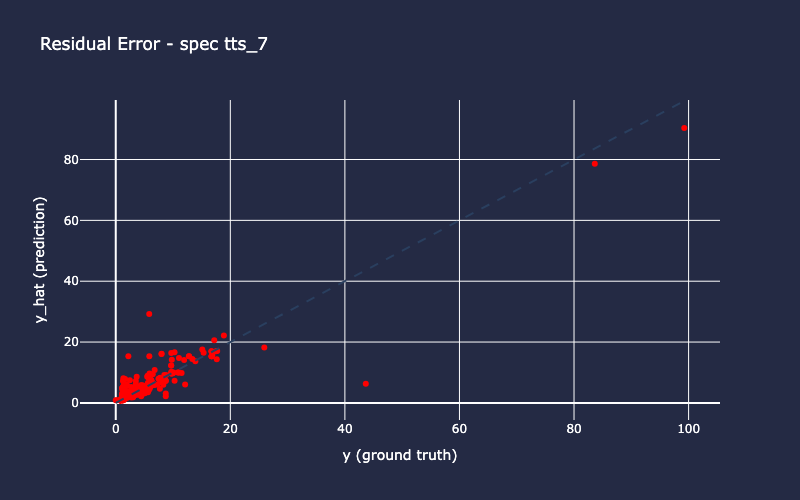
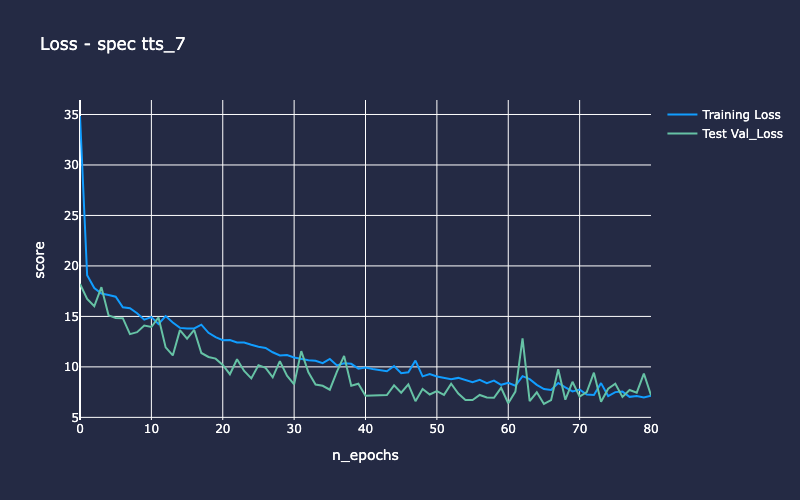
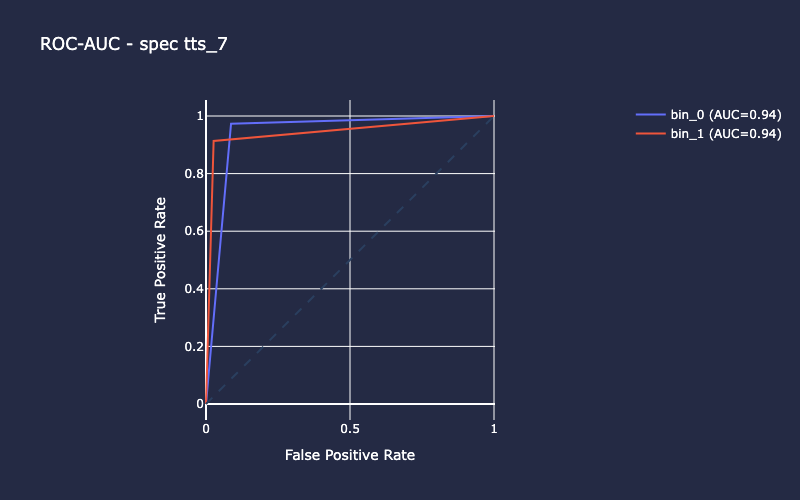
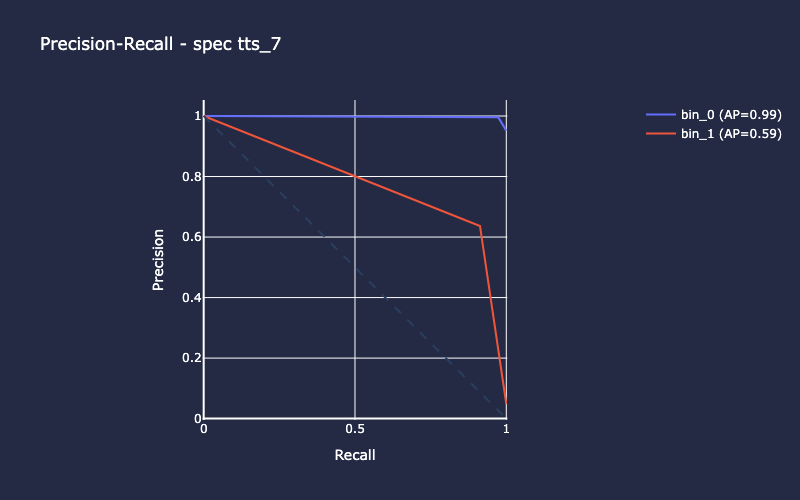
Training Outputs
Assuming you’ve used the default out=None kwarg, the training outputs will be saved in a timestamped folder in your current working directory. In the examples above, this was a folder named “2025-06-24_1750795642”. The exp_mode or JWST model type will be used to create a subdirectory inside that, and any autogenerated files will be stored beneath that as appropriate. The files inside each “results” folder can be auto-loaded using the spacekit.analyzer.compute classes for model evaluation and comparison. If running cross-validation, each iteration’s files will be stored in its own subfolder named using the iteration index (0-9 for 10 folds). Additional metrics will be saved in the summary folder - mean scores for all 10 folds (image-cv-scores.json) as well as individual metrics for each fold iteration (image-cv-metrics.csv). The actual saved models (which can be loaded and used for inference elsewhere) are saved inside models using the model name attribute (e.g. img3_reg.keras and spec3_reg.kers).
2025-06-24_1750795642/
-| image/
    -| data/
        - image-tts_0.csv
        ...
        - image-tts_9.csv
    -| models/
        - img3_reg.png
        -| 0/
            - img3_reg_checkpoint.keras
            - img3_reg.keras
        ...
        -| 9/

    -| results/
        -| 0/
        ...
        -| 9/
            - history.npz
            - loss.npz
            - predictions.npy
            - residuals.npy
            - test_idx.npy
    -| summary
        - image-cv-metrics.csv
        - image-cv-scores.json